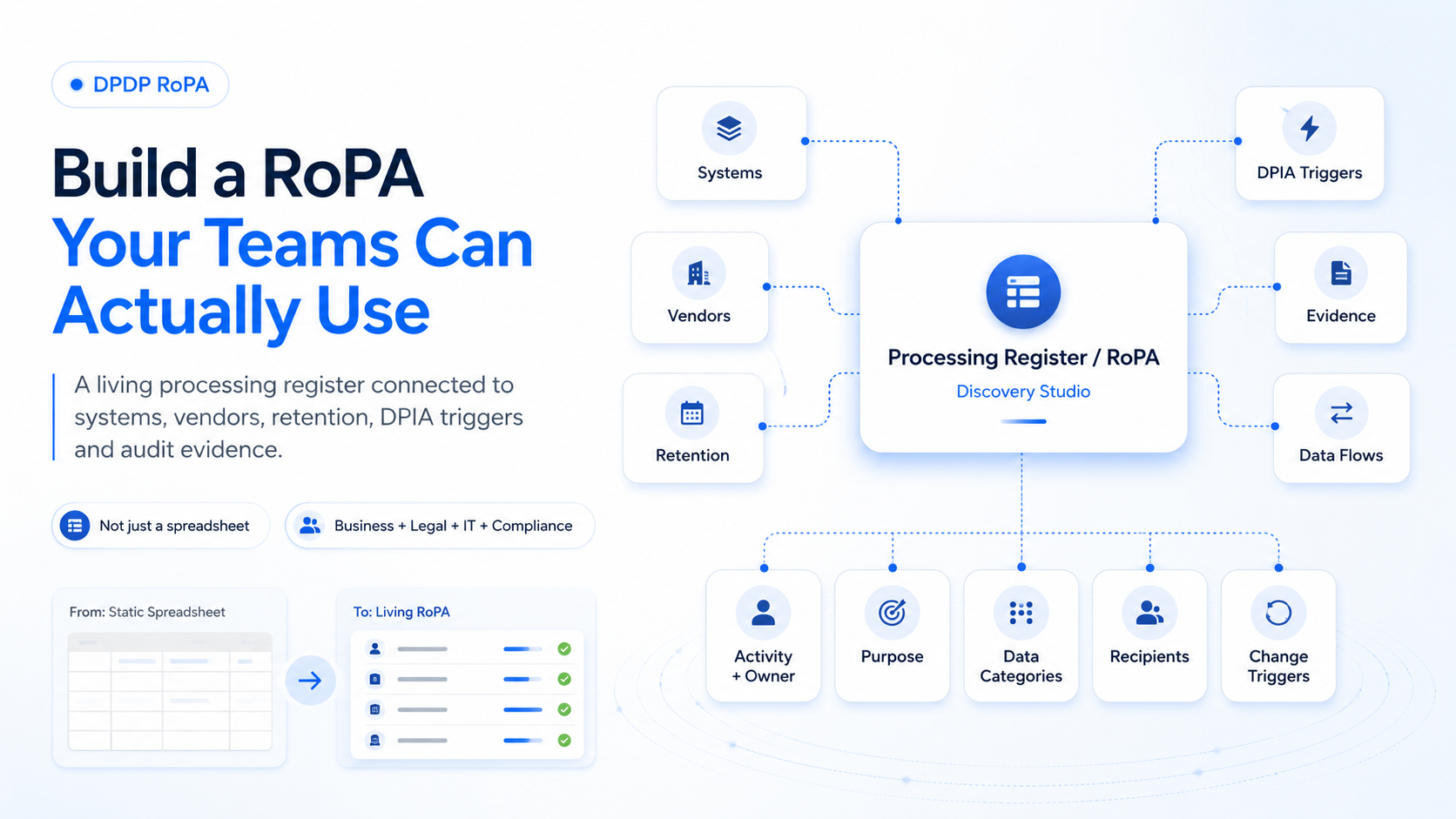
Most organisations can create a RoPA spreadsheet once, but very few can trust it six months later. This blog explains why DPDP-ready enterprises need a living processing register connected to data flows, systems, vendors, retention, DPIA triggers and audit evidence — and how Discovery Studio helps build a RoPA that business, legal, IT, security and compliance teams can actually use.
Overview
Most organisations do not struggle to create the first RoPA spreadsheet.
They struggle to trust it six months later.
The privacy team sends questionnaires. Business teams fill in what they remember. System names are added. Vendors are listed. Retention periods are copied from policies. A few columns remain blank. The file is approved and stored in a shared folder.
Then the business changes.
A new CRM integration goes live. Marketing adds another automation platform. A lending team starts using a fraud-scoring API. Customer support exports records into a reporting tool. Product launches an AI feature. A vendor appoints a sub-processor. Operations continues using an old CSV workflow that was never documented.
The RoPA does not change with any of this.
That is the real problem.
A record of processing activities should not be treated as a document that proves a compliance exercise happened once.
It should help the organisation understand how personal data is processed right now.
For DPDP readiness, the goal is not just to have a RoPA.
The goal is to build a processing register that business, legal, IT, security, product, operations and compliance teams can validate, maintain and use for decisions.
Why do static RoPA spreadsheets fail?
A spreadsheet can store information, but it cannot make the information true.
The accuracy of a RoPA depends on how the organisation discovers, validates and maintains each processing activity.
When teams rely only on questionnaires, gaps appear quickly.
- Business users describe processes differently.
- Legal teams use broad privacy language.
- IT lists applications but may not know the business purpose.
- Procurement knows the contracted vendor but not every sub-processor.
- Security knows access controls but not whether the processing is still necessary.
- Product teams add features faster than privacy registers are updated.
The result is a document that looks complete but cannot answer operational questions.
- Which system receives the data after onboarding?
- Does the marketing platform receive the same data as the CRM?
- Which vendor processes identity documents?
- What happens to exported files after a campaign ends?
- Which AI feature uses customer conversations?
- Why is a retention period five years instead of two?
- Was a DPIA trigger assessed when the processing changed?
A useful RoPA should help teams answer these questions without starting another month-long discovery exercise.
One common failure is creating activities that are too broad.
Customer management is not a useful processing activity if it combines onboarding, support, marketing, fraud prevention, billing, analytics and collections.
Each of those activities may involve different purposes, personal-data categories, systems, vendors, retention periods, risks and customer expectations.
If everything is recorded under one broad row, the organisation cannot clearly assess purpose limitation, vendor exposure, retention, DPIA triggers or audit evidence.
What should a DPDP-ready RoPA include?
A practical RoPA should link each processing activity to the systems, owners and evidence that support it.
It should not be only a legal description of processing.
It should be an operational map of how personal data actually moves.
A DPDP-ready processing register should include:
- Activity and owner: what business process is taking place and which function is accountable for keeping it accurate.
- Purpose: why the personal data is processed and whether the purpose is specific enough to test necessity and downstream use.
- Data categories and individuals: what personal data is involved and whose data it is, such as customers, employees, applicants, vendors, patients, borrowers or children.
- Systems and data stores: where the data is collected, stored, transformed, exported and archived, including databases, SaaS tools, emails, shared drives, CSVs and scanned records.
- Vendors and recipients: which processors, sub-processors, partners or internal entities receive the data and for what purpose.
- Retention and deletion: how long the information is retained, what rule supports that period and whether the system can actually enforce deletion or restriction.
- Risk and DPIA triggers: whether the activity involves profiling, large-scale processing, vulnerable individuals, monitoring, financial decisions, health information, AI or new technology.
- Evidence: which notice, consent record, policy, contract, ticket, approval, security control or system configuration proves the activity is governed.
- Change triggers: which events require review, such as a new vendor, new purpose, new data field, new geography, AI feature, retention change, security incident or customer-journey redesign.
Without these links, the RoPA remains a description.
With these links, it becomes a governance tool.
This matters because RoPA quality affects much more than the RoPA itself.
A weak processing register creates weaknesses in DPIA review, vendor governance, retention planning, consent and notice alignment, security prioritisation and audit readiness.
These are not separate problems.
They are different views of the same operating reality.
How does Discovery Studio build a usable RoPA?
Discovery Studio by OpenBlockAI is designed as a pre-implementation DPDP readiness workspace.
It helps enterprises discover where personal data exists, how it flows, which processing activities depend on it, which vendors receive it and what evidence supports each activity.
Discovery Studio does not treat RoPA as a one-time spreadsheet exercise.
It helps teams create a validated processing baseline by combining structured discovery, business-team input and evidence review.
It can help discover personal data across:
- Databases and core applications.
- SaaS tools and CRMs.
- CSV files and spreadsheets.
- Email attachments.
- Google Drive and Microsoft 365 folders.
- Scanned documents and legacy records.
- APIs, logs and operational systems.
- Vendor contracts and processor workflows.
Discovery Studio then helps convert scattered inputs into practical outputs:
- Personal data inventory.
- Data-flow map.
- Processing-activity register.
- RoPA draft.
- DPIA trigger report.
- Vendor and processor register.
- Retention-gap view.
- Evidence room.
- Risk heatmap.
- DPDP implementation plan.
This allows the organisation to move from we have a RoPA to better questions:
- Can business owners validate each activity?
- Can we trace the systems and vendors involved?
- Can we show why the activity exists?
- Can we identify when a DPIA may be required?
- Can we prove the retention rule?
- Can we update the record when the business changes?
That is the standard a useful RoPA should meet.
Build a RoPA You Can Defend
A strong RoPA should be specific enough to support purpose, risk and retention decisions.
It should be connected to real systems, vendors and evidence.
It should be owned by the business, not only by legal or privacy.
It should be reviewed when processing changes, not only before an audit.
It should be structured consistently across teams and entities.
And it should be capable of feeding DPIA, vendor, consent, retention and implementation workflows.
The goal is not to make the spreadsheet larger.
The goal is to make the processing record reliable.
A RoPA is useful only when the organisation can trust what it says.
If it misses unstructured data, it is incomplete.
If it ignores new vendors and AI tools, it is outdated.
If retention periods have no system evidence, it is weak.
If business owners cannot validate the activities, it is disconnected from operations.
Discovery Studio helps enterprises turn scattered knowledge about data, systems, vendors, purposes, risks and evidence into a structured DPDP readiness baseline.
Because audit readiness does not start with a spreadsheet.
It starts with knowing how personal data is actually processed.
Start with a detailed DPDP readiness assessment using Discovery Studio.